 FoxySing
Пой любимые песни и видь каждую нотуSing the songs you love and see every note
Закидываешь трек — FoxySing отделяет голос от музыки, находит ноты певца и показывает их на бегущем графике. Поёшь в микрофон — поверх нот рисуется твоя линия, и сразу видно, попал ли ты.Drop in a track — FoxySing separates the voice from the music, finds the singer's notes and shows them on a scrolling graph. Sing into a microphone and your own line is drawn over the notes, so you see at once whether you hit them.
Скачать FoxySingGet FoxySing Для Windows 10 и 11 (Mac и Linux — по запросу), без облака и подпискиFor Windows 10 and 11 (Mac and Linux on request), no cloud and no subscriptionЧто умеетWhat it does
Всё работает на твоём компьютере: песни, ноты и записи никуда не уходят. Несколько необязательных онлайн-сервисов включаются только с твоими личными ключами.Everything runs on your computer: songs, notes and recordings stay with you. A few optional online services work only with your own keys.
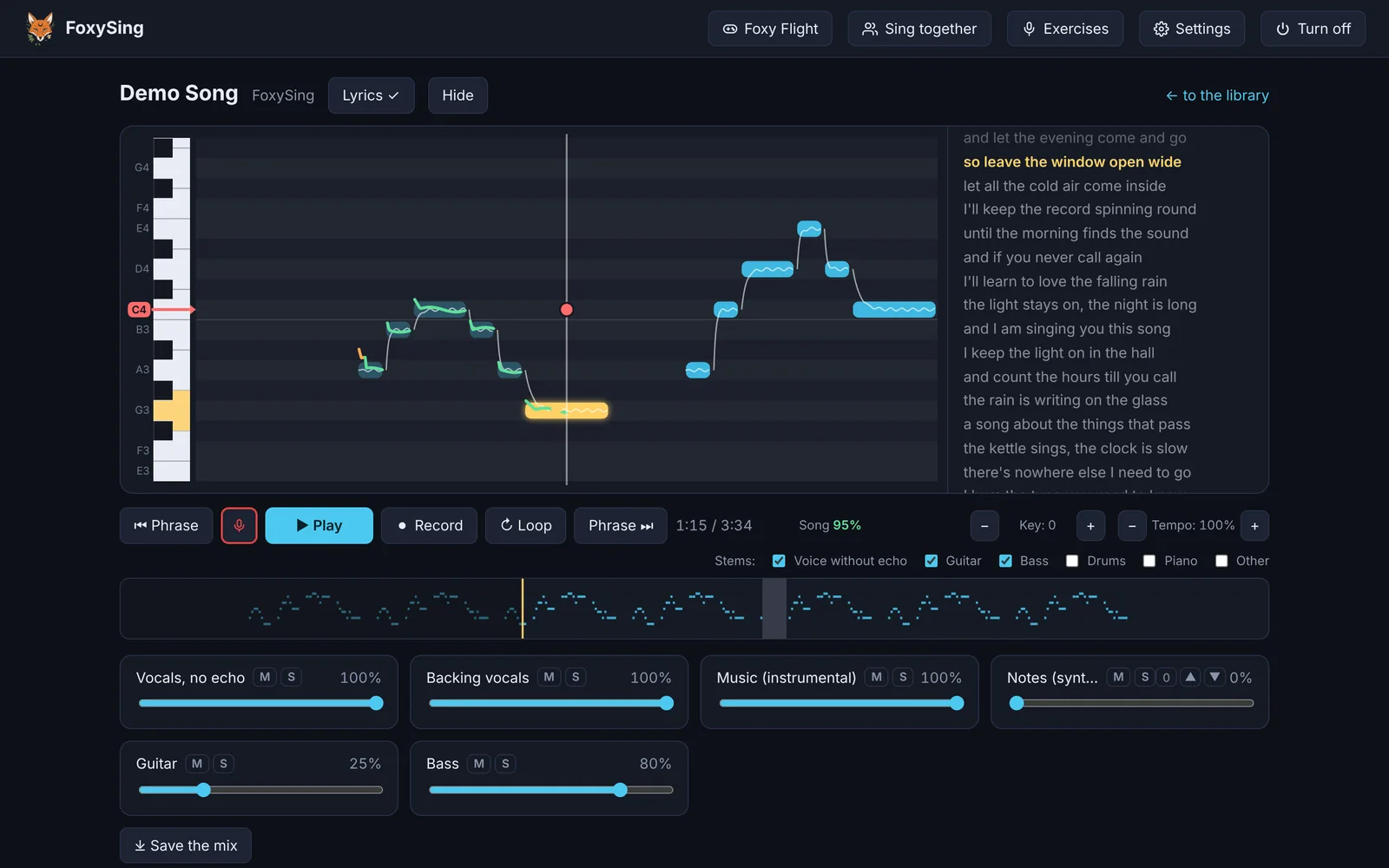
Ноты певца и твой голосThe singer's notes and your voice
Голос, музыка и бэк-вокал — отдельными дорожками со своей громкостью. Сдвиг тона и темп, повтор трудного места, оценка нот и ритма за каждую попытку.Voice, music and backing vocals as separate tracks with their own volume. Key shift and tempo, looping a hard part, a score for notes and rhythm on every attempt.
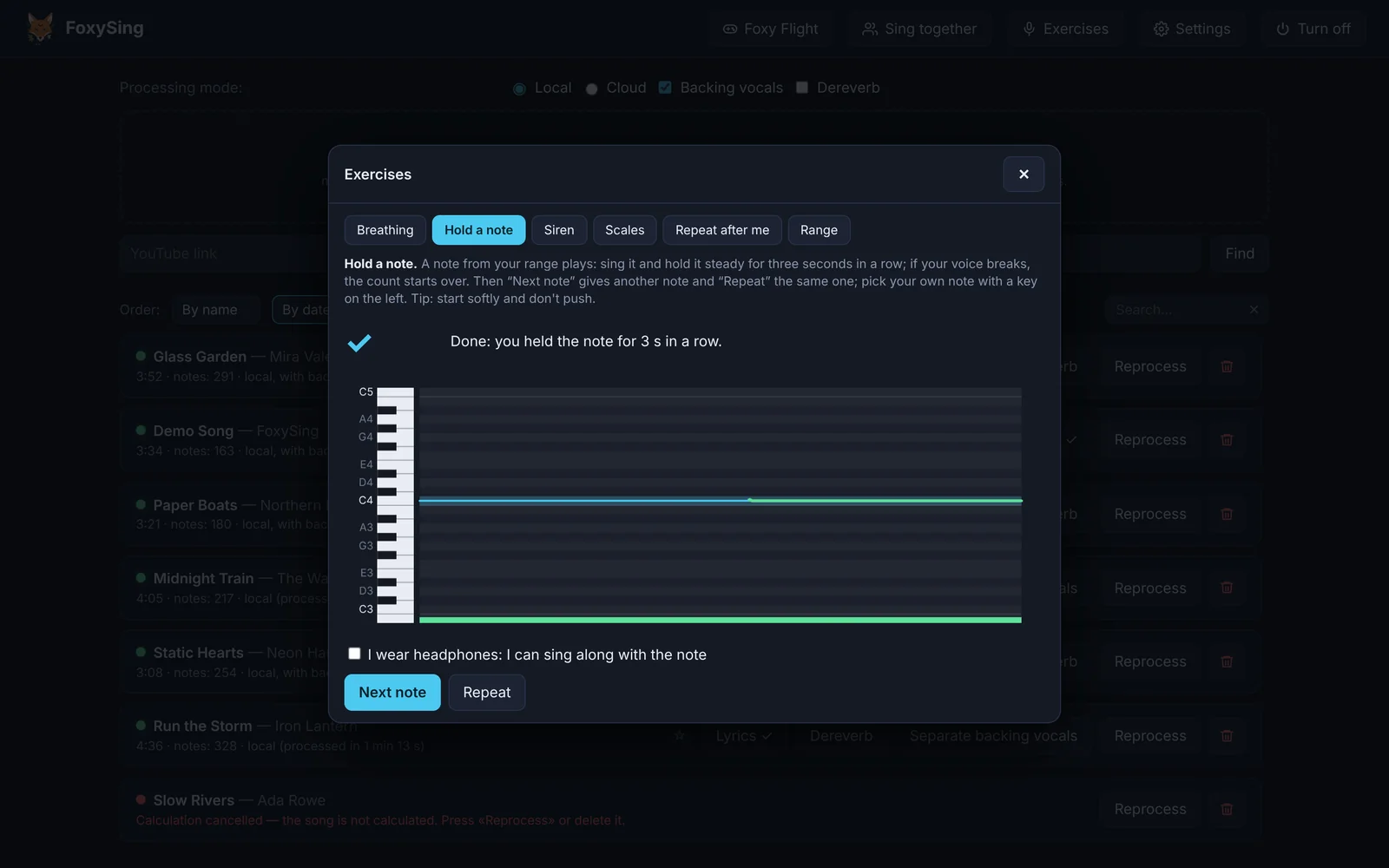
Упражнения для голосаVoice exercises
«Держи ноту», «Повтори мотив», гаммы и замер диапазона — в твоём диапазоне, с подсказками, если поёшь выше или ниже.«Hold a note», «Repeat the motif», scales and a range check — in your own range, with hints when you sing too high or too low.
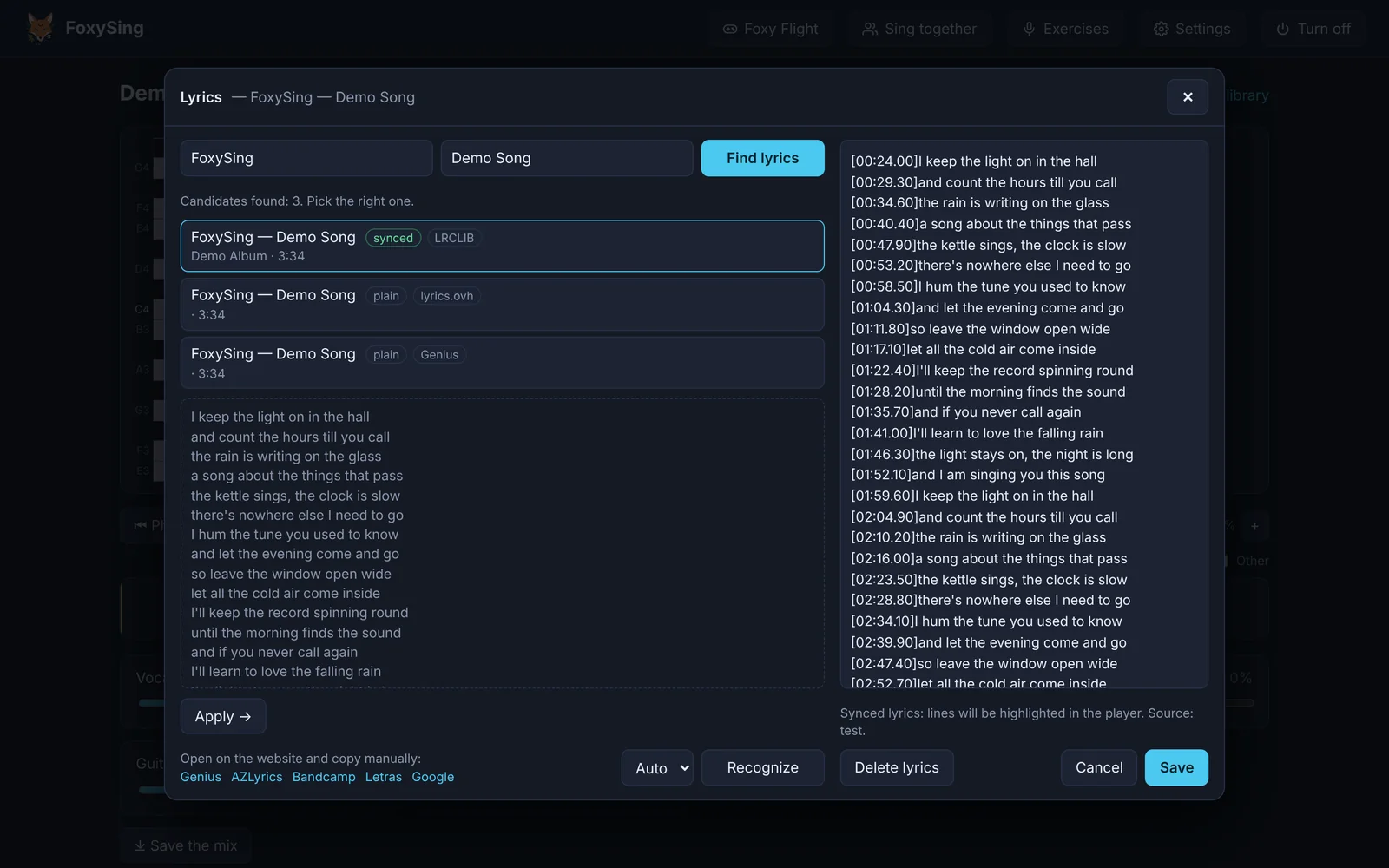
Тексты песен в тактLyrics in time
Текст находится сам — из тегов файла или открытых источников — и идёт строками в такт песне. Можно поправить или вставить свой.Lyrics are found by themselves — from the file's tags or open sources — and scroll line by line with the song. You can fix them or paste your own.
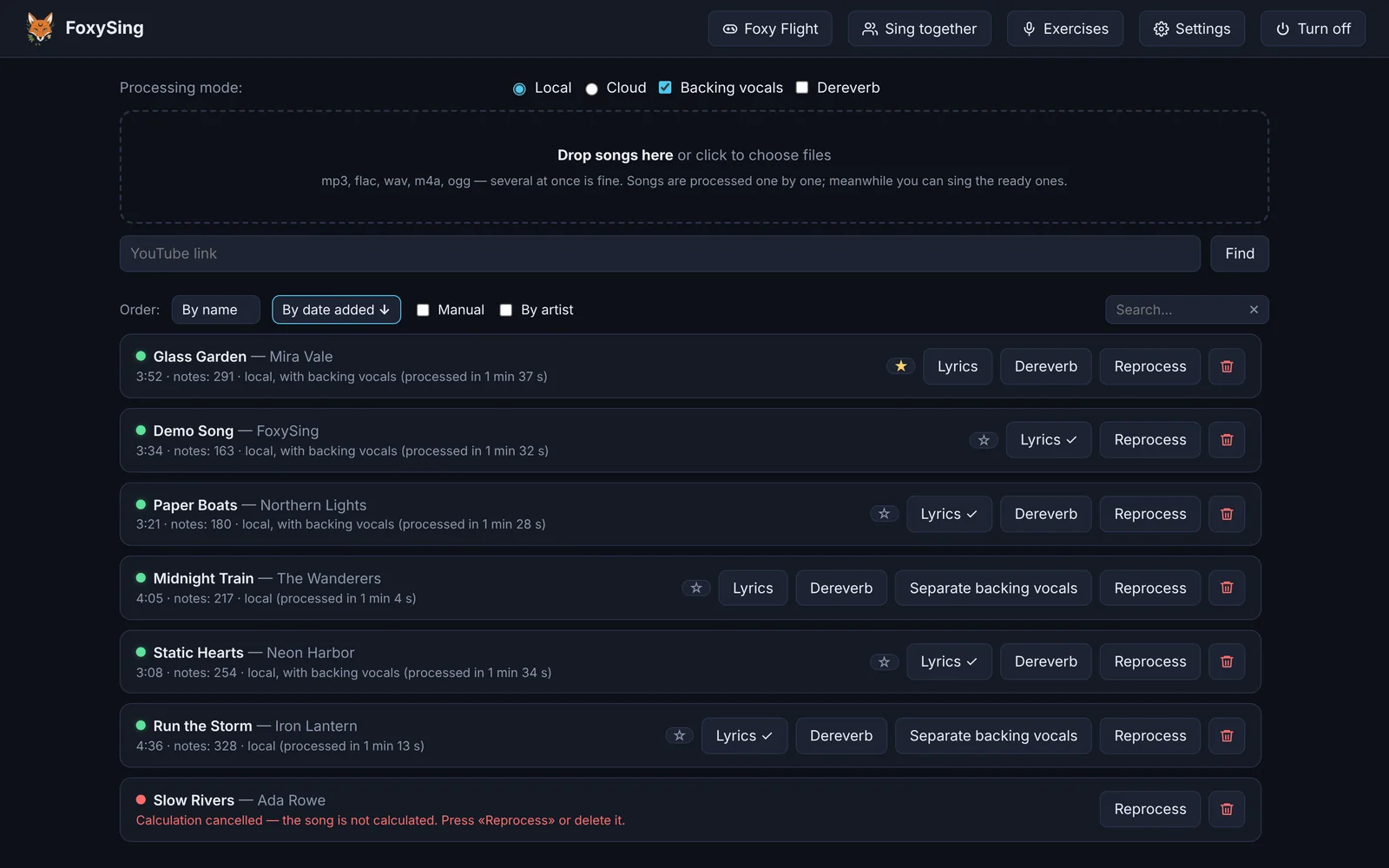
Твоя библиотекаYour library
Песни с прогрессом и лучшими попытками, избранное и свой порядок. Обработка новой песни идёт в фоне, пока ты поёшь другую.Songs with progress and best attempts, favourites and your own order. A new song is processed in the background while you sing another one.
Караоке-вечеринка с друзьямиA karaoke party with friends
Зови друзей: каждый поёт в свой микрофон или телефон и видит свою линию на графике.Invite friends: everyone sings into their own microphone or phone and sees their own line on the graph.
Петь вместеSing together
До трёх микрофонов на одном компьютере или телефоны гостей — дома по Wi-Fi или по ссылке из интернета.Up to three microphones on one computer, or your guests' phones — at home over Wi-Fi or through a link from anywhere.
Foxy Flight
Игра: лиса летит на высоте ноты, которую поёшь. Сложность растёт сама, а с гостями это гонка — каждый в своём диапазоне.A game: the fox flies at the height of the note you sing. It gets harder by itself, and with guests it turns into a race — everyone in their own range.
Свой телефонYour own phone
Библиотека, ноты, текст и музыка на твоём телефоне — пой где угодно дома, пока тренажёр работает на компьютере.Your library, notes, lyrics and music on your phone — sing anywhere at home while FoxySing runs on the computer.
Посмотри, как это выглядитSee it in action
УстановкаInstallation
Скачай установщикDownload the installer
Файл FoxySing-Setup — после покупки придёт ссылка.The FoxySing-Setup file — the link comes after the purchase.
Разреши запускAllow it to run
Установщик пока без платной подписи, поэтому Windows может предупредить: «Подробнее» → «Выполнить в любом случае». Если антивирус придержит файл — добавь его в исключения.The installer has no paid signature yet, so Windows may warn you: «More info» → «Run anyway». If your antivirus holds the file back, add it to the exceptions.
Дождись установкиLet it install
Мастер сам скачает всё нужное — 20–40 минут, в основном загрузка. Потом ярлык FoxySing на рабочем столе.The wizard downloads everything it needs — 20–40 minutes, mostly downloading. Then there is a FoxySing shortcut on the desktop.
Частые вопросыQuestions
Нужен ли интернет?Do I need the internet?
Только для установки, обновлений и поиска текстов. Разделение песен, ноты и пение работают без сети.Only to install, to update and to look up lyrics. Separating songs, the notes and singing work offline.
Куда уходят мои песни и голос?Where do my songs and my voice go?
Никуда: всё хранится и обрабатывается на твоём компьютере. Облачная обработка есть, но только по желанию и с твоим ключом.Nowhere: everything is stored and processed on your computer. Cloud processing exists, but only if you turn it on with your own key.
Какие песни можно загружать?Which songs can I use?
Свои файлы — mp3, flac, wav, m4a и другие. Права на песни остаются у правообладателей: тренажёр — для личных занятий.Your own files — mp3, flac, wav, m4a and more. The rights to the songs stay with their owners: FoxySing is for your own practice.
Почему ругается антивирус?Why does my antivirus complain?
Установщик новый, без платной подписи, и он скачивает и распаковывает программы и модели — некоторые антивирусы так оценивают поведение файла. Большинство его не отмечают; о ложных срабатываниях мы сообщаем производителям.The installer is new, has no paid signature, and it downloads and unpacks programs and models — some antiviruses judge files by such behaviour. Most do not flag it; we report false positives to the vendors.
А Mac и Linux?What about Mac and Linux?
Готовая сборка пока только для Windows. Версию для Mac или Linux можно получить по личному запросу — напиши на ed9ward@gmail.com.The ready build is Windows-only for now. A Mac or Linux version is available on personal request — write to ed9ward@gmail.com.